

General
How do I apply for a job through Manpower?
Does Manpower pay weekly or monthly?
Who will support me during my assignment?
Will I be employed by Manpower or by the client?
Do I need experience to register with Manpower?
How long does it take to find work with Manpower?
FastTrack
How will I access the FastTrack system?
You will receive a link from [email protected] to the FastTrack website prior to your new assignment starting.
What happens if I cannot log in to the system?
Please contact your Associate Management Team for assistance if you have any trouble gaining access.
Who do I contact to navigate the FastTrack system?
FAQs and detailed user guides are available. Links will be emailed to you and your Associate Management Team will also be on hand to provide support if needed.
FastTrack Timesheet Portal User Guide
Timesheet Approver FastTrack Reference Guide
What do I do if I get locked out of my FastTrack account?
Your FastTrack Candidate ID begins with 1000. This number was provided to you when you received your login credentials. Please make sure you are using this 1000-series number as your User ID - your email address is not your User ID.
If you need assistance, please contact your Associate Management Team.
How will I know how much annual leave I have accrued?
Your leave balance will be detailed on your payslip.
Do I upload any sickness documentation in FastTrack?
No, currently, all sickness documentation should be emailed to [email protected]. If there are any changes to this process in the future, we will notify you promptly.
Does Manpower operate a pension scheme and will I be auto enrolled?
Yes, Manpower operates a NEST salary sacrifice pension scheme, you will be auto enrolled into this at 12 weeks if you are eligible.
How do I know what rate code to use?
You will receive details outlining any rate codes you need to use along with their corresponding pay rates.
How do I report sickness?
You must inform your line manager or recruiter of any absence.
How do I request annual leave?
Please contact your Associate Management Team to advise.
How will I know if my timesheet has been approved?
You can check the approval status of your timesheets in FastTrack by accessing the Historical section, which contains all past timesheets, including approved ones. Each timesheet will display its status: Approved, Pending, or Rejected. Your user guides will provide step-by-step instructions on how to access the Historical section and view your timesheet statuses.
In which section of Time and Attendance should I enter my Timesheet?
Unless otherwise advised, please enter your time in the Additional Items section.
What are rate codes?
Rate codes represent the different pay rates you select based on when you are working. For example, “STD” indicates standard time, and “OT” indicates other time.
What do I do if I can’t see my timesheet to submit time?
Please ensure that you are using the correct week ending date filters within time and attendance (Incomplete timesheet). If you still have issues, please contact your Associate Management Team.
When does my holiday year run from and to?
Unless you are advised otherwise, your holiday year will run from 1st February to 31st January.
When will my Payslips be available to view on the portal?
If a timesheet has been entered into and approved within the correct deadlines your payslip will be produced on a Wednesday evening. Anything else picked up and processed after this point but also paid for in that week, will be reflected on a payslip that is produced on Friday.
Why is my holiday showing as pending?
If you are using FastTrack to submit holiday - Your holiday is showing as pending as you have clicked 'save' - for holiday to be processed, you should click 'submit.
Why is my Leave entitlement showing as blank?
Your leave entitlement will only show as blank if you have no leave entitlement left to use.
Why would I receive more than one pay slip/remittance in a week?
The system generates payslips based on the category of pay being processed. This may result in receiving multiple payslips, but all payments and deductions will still be combined into a single payment.
HSBC
Timesheets
At the beginning of your assignment, you will receive an email confirming if you submit your timesheet via Fieldglass or Clarity, and a user guide will be provided via email.
Fieldglass Timesheet Submission
- The deadline for your timesheet to be both submitted and approved by your Manager in Fieldglass to ensure payment for the following Friday is 10:00 Monday. Timesheets should be submitted each week.
- If you are on a daily rate, any logged hours below 4.1 hours will result in Fieldglass calculating as 1/2 day worked, anything above 4.1 hours will be calculated as a full day worked.
- If you have submitted your timesheet incorrectly, you will have the option to withdraw and amend the timesheet prior to approval. If it has already been approved by your authoriser, you will be able to click the Revise button under the Actions header on the top right on your timesheet, edit and resubmit for approval.
- For the Fieldglass User Guide, please Click Here
- If you are experiencing any difficulty, please contact the Contractor Care Team: [email protected]
Clarity Timesheet Submission
- The deadline for your timesheet to be submitted and approved in Clarity to ensure payment for the following Friday is 00:00 Sunday.
- If you submit your timesheet in Clarity, you do not also submit in Fieldglass.
- For the Clarity User Guide, please Click Here
Pay
General Information
- You will be paid one week in arrears every Friday provided your submitted timesheet has been approved by your manager by 10am on Monday morning for Fieldglass users or 00:00 Sunday for Clarity users. If your timesheet has been approved after the deadlines, payment will be made the following week.
- If you have not received payment, we would suggest checking that the timesheet has been submitted and approved prior to the above deadlines and that the correct task codes and hours have been submitted. If you have checked and still believe you are missing payment, please reach out to the Contractor Care Team at [email protected], who will support with your enquiry.
Payslips (PAYE only)
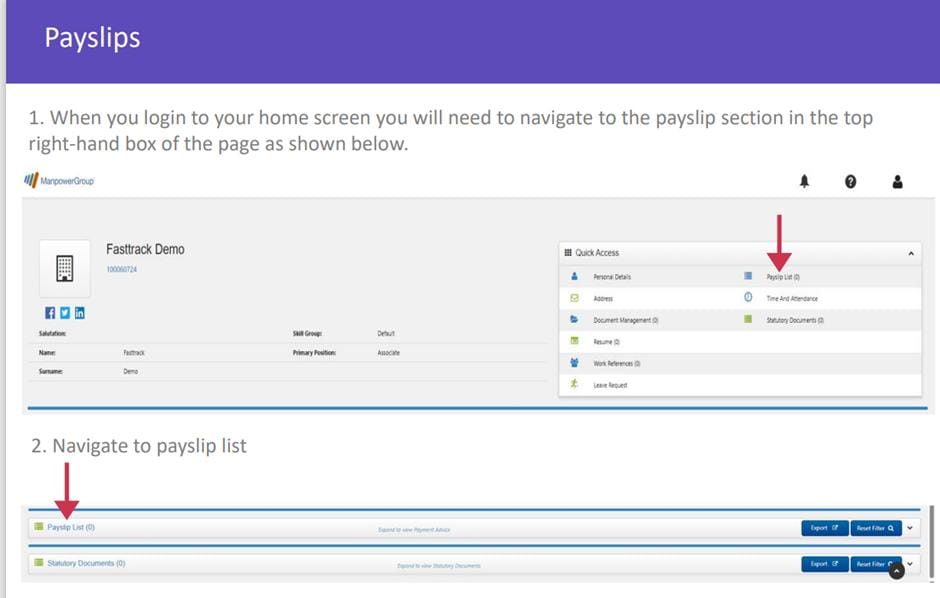
- Manpower Payslips, P45’s and P60’s will be available to view online via FastTrack (https://manpower.fasttrack360.co.uk)
- You will receive an email within your first week of employment containing your Manpower Employee Number and instructions on FastTrack registration. Manpower Employee Numbers are 10 digits in length and will start with 1000, this is not your HSBC staff ID which is 8 digits.
- For payslip queries, or if you are unable to access FastTrack please contact the Contractor Care Team: [email protected]
Tax
- If you have a P45 from previous employment, please send this through to the Contractor Care Team [email protected] for processing. You may pay emergency tax in the first few weeks of your assignment. There is a process which HMRC follow to determine the correct tax code to be used and any updates will be sent by HMRC to Manpower.
- HMRC issue your tax code, Manpower cannot change this code until we receive a P6 coding from HMRC. If your tax code is amended by the HMRC, they will notify you as to how an over/underpayment will be rectified.
- HMRC can be contacted directly on 0300 200 3300, alternatively, please find further information on Tax via the HMRC Website
Pension
- Manpower has chosen NEST (National Employment Savings Trust) as our workplace pension provider to meet our employer duties and to help you put money aside for your retirement. Manpower operates Pension scheme as a Salary Sacrifice. Salary Sacrifice is when you give up the right to receive part of your pay in return for the employer’s agreement to provide some form of non-cash benefit in this instance pension.
- After 12 weeks service, you will be auto-enrolled and NEST will send you an information pack with further details of the scheme and OPT OUT options. Auto-enrolment of employees into a pension scheme is required by law and further information regarding auto-enrolment can be found on Gov.uk
- Pension contributions will be found on your payslip after 12 weeks’ service. The contributions are based on pensionable qualifying earnings and are 3% Employer, and 5% employee. An employee can increase their contributions; however, please note, Manpower will still contribute a maximum of 3% of qualifying earnings. Your pension contributions are deducted weekly and paid over to NEST the following month.
- If you would like to opt-in to the scheme prior to 12 weeks, or increase your employee pension contributions, please contact [email protected]. For any further questions regarding enrolment or opting out, please contact NEST directly Here.
Maternity/Paternity
- If you have any queries regarding Statutory Maternity or Paternity pay, please contact [email protected] and a member of the team will be able to assist.
Holidays
Holiday Accrual (PAYE only)
- Holiday is accrued weekly as you submit timesheets for hours worked. Entitlement to payment for leave accrues in proportion to the amount of time worked on assignment during the holiday year. Your annual holiday entitlement can be found in your contract which includes Bank Holidays as a statutory entitlement. Please remember your holidays are pro-rata and will accrue from your start date until the end of the holiday year.
- All holiday you have accrued during the year must be taken before the end of the holiday year or you will lose them. You cannot carry any entitlement forward into a new holiday year. The holiday year runs from 1st of January to the 31st of December.
- Your current holiday accrual can be located towards the bottom of your most recent payslip. To calculate your available accrual, divide your accrual by your current daily or hourly rate. This will give you the number of days or hours of annual leave you have available to use.
- If you are engaged via an Umbrella company, please reach out to them directly for support with holiday queries.
Booking Holidays
- Holidays must be authorised by HSBC in the first instance, this allows HSBC to check availability from a resourcing perspective. Once approved by HSBC, you must then book these in Fieldglass or Clarity on the relevant timesheet.
- ManpowerGroup process holiday pay in either full (7 hours) or half day (3.5 hours) increments.
- If your holiday request exceeds your current total accrual, you will be paid to the nearest half day or 3.5 hours (rounded down) of your current accrued total holiday pot.
- If you do not have enough accrual to cover your annual leave, you can claim payment at a later date when you have accrued more holiday, either by revising the relevant timesheet, or by contacting [email protected].
- Please note, Bank Holidays are paid from your accrual and must be claimed through your timesheet as “Paid Leave” (Fieldglass users) or “Holiday” (Clarity users).
- To book holiday on a Fieldglass timesheet, use the “Add Task” button to locate the Non-Billable Task Code “Paid Leave”, and enter time on the relevant hours/days. For the Fieldglass User Guide, please Click Here
- To book holiday on a Clarity timesheet, use the “Holidays” task code and enter time on the relevant hours/days. For the Clarity User Guide, please Click Here.
Attendance
Late Attendance or Absence
- You must report late attendance to HSBC as soon as possible. You may be asked to work this time back – this will allow you to complete your weekly hours.
- You must contact HSBC on each day of your absence and update on your return date unless a fit note has been issued by a medical professional. You will not be entitled to company sick pay, however, you may be entitled to statutory sick pay.
- Lateness and absence will be managed in line with HSBC policy.
Statutory Sick Pay (SSP)
- You may be entitled to Statutory Sick pay (SSP) and can ‘self-certify’ for the first seven calendar days. Following this, a fit note from a medical professional will need to be provided. Under government regulations, SSP is not payable in the first 3 days of sickness and is subject to tax and national insurance. If eligible, the amount to which you are entitled and further information can be found Here.
- To self-certify for the up to the first 7 days, please complete the link below which allows you to download a PDF version of the self-certification form (SC2) Employee’s statement of sickness to claim Statutory Sick Pay - GOV.UK (www.gov.uk).
- Please send Fit Notes and completed Self Certification forms through to [email protected] for processing.
Manpower People and Culture
MyPath
MyPath is Manpower’s exclusive upskilling and development program and connects you with opportunities to advance your skills and meet employers’ needs today and in the future. Throughout the programme, Manpower will provide personalised guidance through a dedicated Talent Manager who will support you in finding your path, gaining new skills and achieving your goals. Associates who join us on the MyPath programme are also offered access to a wide range of fantastic discounts and benefits through our partnership with AON, a leading employee benefits provider.
If you are interested in signing up to the MyPath programme, please send an email expressing your interest to [email protected] and a Talent Agent will be in contact with you.
Further information can also be found via MyPath – ManpowerGroup
Wellbeing
At Manpower, we have our people’s welfare at the heart of our organisation, where we look after ourselves and each other. We continuously evolve our ideas across Manpower to nurture a sustainable wellbeing approach, focussing on how we help ourselves, how we work, and how we engage with each other. We hope you enjoy exploring our new Associate Wellbeing Hub to support your mental and physical health at work.
Associate Charter
At Manpower we strive for excellence in everything that we do. That includes our service to you, our Associates.
From your application and onboarding process, to our development programmes and how we keep you up to date, through to support with your health and wellbeing and our commitment to diversity, equality and inclusion - we want your experience of being a Manpower Associate to be the best it can be!
That’s why we're proud to announce our Associate Charter. The Associate Charter summarises our promise to you across our four pillars: engagement, development, wellbeing and recognition. It outlines what we expect from you and what you can expect from us. It ensures that all Associates are treated fairly and will introduce you to Manpower’s culture and values.
To access our Associate Charter, Click here.